



Existing since 2017, SpinPanda online casino has managed to become one of the most popular and recognisable brands in the global gambling industry. Visitors appreciate the fact that the administration has chosen not to splurge on sports betting as well, and has focused only on casino entertainment – this allows them to offer customers only the best slots and live casino games, as well as to hold a huge number of different draws and tournaments. To enjoy all the benefits of SpinPanda, you need to become a client by completing a simple registration – here’s how to do it.
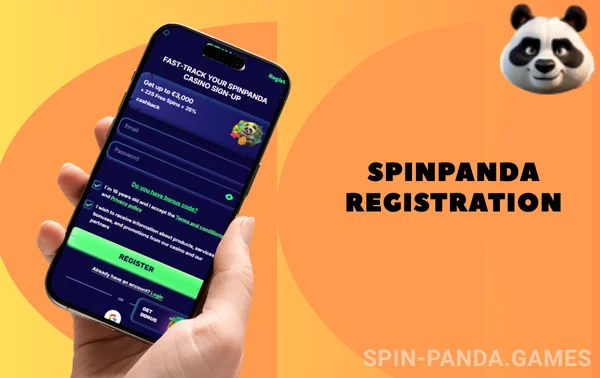
SpinPanda Registration
Why register at SpinPanda?
The interface of the SpinPanda website or mobile app can actually be used without registration: by taking advantage of the demo mode, you can spin slots without spending money. But the demo mode has its disadvantages: it is only valid for slots and cannot be used in the live casino section, plus, more importantly, without betting real money, a player cannot claim real winnings. That’s why the administration and allows access to games in demo mode even unregistered users – it is no longer gambling.
If you want to fully play for money in thousands of titles of gambling games presented on the site, registration is mandatory. When you are authorised, the system will be able to recognise the visitor, credit him with his due winnings and offer lucrative bonuses.
Full registration at SpinPanda is also necessary because the administration is subject to the laws that are relevant in the vast majority of countries around the world: even if gambling is allowed, access to them can only be obtained by users of legal age. Therefore, be ready to provide documents at our first request, otherwise we simply will not have the right to serve an anonymous player.
Step-by-step SpinPanda registration process
The registration procedure at SpinPanda is designed to make creating an account as easy as possible, even for the completely untrained user. It’s okay if you have never been a client of an online casino before and do not know how to register – the sequence of steps is intuitive, the interface of our site ‘leads’ a potential client from step to step. It remains to clarify that in general the procedure will take no more than a couple of minutes.
At the same time, we realise that misunderstanding of the principles of registration is still possible for some customers, so we suggest that you understand how to create an account.

Step 1: Visit the official SpinPanda website
According to our internal statistics, the majority of users register via the SpinPanda website, but in fact you can also create an account directly via the app. However, in this instruction we will not dwell in detail on the principle of registration via the mobile application - we will consider it later, and in general it does not differ significantly from creating an account on the website.
So, having launched the official site SpinPanda, pay attention to the upper left corner - there is a button with the eloquent name ‘Registration’. Click on it and you can move on to the next stage of account creation.
Note that some users will not open the site - this is due to the existence of blockages in those countries that strictly regulate the gambling sphere and do not allow the domestic market companies without a local licence. To bypass this restriction, use any VPN service or find a mirror - a copy of the SpinPanda site on an alternative domain.

Step 2: Choose how to register
At SpinPanda we have foreseen that different users will have different approaches to registration: someone has already made a final decision to become a client, while many cautious visitors will prefer to look around first, without providing an array of personal money. That's why our administration offers three equal variants of the registration form - choose the one you like better:
- - by e-mail - specify e-mail, country, game account currency, surname and first name, made-up password;
- - by phone number - specify phone number and code from sms-message, surname and name, game account currency and invented password;
- - via social networks - you only need to specify your country and game account currency, and the account is created in connection with your Telegram, Google or Line account.

Step 3: Fill in the form and claim your bonus
Whichever form you choose, be sure to fill in all fields, leaving only the promotional code field blank. Take into account that all the information provided must be true: in the future we will check whether you are really the person you claim to be. Most gambling sites offer a sign-up bonus for a choice of either sports betting or online casino. SpinPanda does not have a sports section, accordingly, the incentive is given only for casino gambling. In fact, there are two such bonuses: an ‘ordinary’ one in the form of 100% or 150% up to $300 and 100 freespins with no wager, or a VIP bonus for high rollers who can claim rewards up to $4,000 (100% on the first deposit)! Please note that the bonuses are deposit bonuses - that is, they will not be given for registration as such, but rather for making a deposit. Immediate withdrawal of bonus money is impossible - first perform wagering as it is prescribed in the rules.

Step 4: Submit the form and confirm your account
When all the fields of the registration form are filled in, click the ‘Register’ button - from this moment you become a client of SpinPanda and can use all the functions of the site. At the same time, you may need a separate account activation, confirming that you specify your real contacts. In the case of a phone number, the code from the sms must be specified in the registration form - without doing this, you simply can not register in this way. When registering by email, account confirmation is done after the account has been created. Look for an email from SpinPanda with a link in your inbox - just click on it and we will realise that you have entered the correct email. The email with the link to activate your account usually arrives within one or two minutes after you create your account. If it's not there for a long time, check your spam folder. Alternatively, it could be a typo in your email address - if so, just re-register.

Step 5: Fund your account to start placing bets
When planning to bet for real money, you must first top up your gaming account balance. Depending on which currency you have chosen and which country you have specified, the payment page will display the most convenient options for depositing and withdrawing funds - in most cases there is a choice of at least a dozen options. Next to each direction for transactions there is detailed information about the conditions under which the payment is made:
- -minimum payment amount shows what size transactions are processed;
- -there is usually no commission, but we specifically state this information so that you understand how much money will be credited to your account;
- -crediting timeframe shows how quickly funds will be credited to the balance, with deposits usually available for use almost instantly.
How to get SpinPanda bonus
The welcome bonus is one of the most important arguments in favour of registering at SpinPanda; in addition to the first deposit bonus, you can count on gifts for three subsequent deposits, and current users also remain participants of the bonus programme. But since the topic of this article is registration, we will pay special attention to the first deposit bonus.
When you sign up for an account, first make sure in your personal cabinet that you have not refused to participate in the bonus programme. This is extremely important: if you have declined the bonuses, the first deposit will be credited without incentives, and you will not be able to win it back. Players who have created an account denominated in any cryptocurrency do not participate in the bonus programme and cannot count on a bonus for the first deposit.
After making sure that you participate in the bonus programme, make a qualifying deposit of at least $15 (or the equivalent in another currency). After that, the bonus will automatically be credited to a separate bonus account. SpinPanda has a gradation of the welcome bonus depending on how quickly the deposit is made: if you hustle and deposit within 3 hours of registration, you will get 150% of the bonus, while those who are slow will be limited to 100% of the deposit amount.
In order to withdraw the money, the gift must be rolled over 40 times within 7 days; for example, if you are given a $100 reward, you need to bet a total of $4000. Your bankroll will not be affected: only bets made for bonus funds are counted in the wagering. When wagering the bonus, you cannot wager more than $7 – that is, prepare to play a lot and intensively if you want to take the money.
Although the main game account is not involved in wagering, you cannot order withdrawals during the wagering process.
| First Deposit Incentive | Up to $300 and 100 freespins |
| Minimum deposit | 15 USD |
| Wager | x40 for cash, no wager for freespins |
| Wagering time | 7 days |
SpinPanda registration on a mobile device
If you don’t have a PC or laptop, it’s no reason to refuse to register at SpinPanda, because you can also create an account using your smartphone or tablet. On both gadgets, you can do it either through the mobile site or through the app for Android devices.
The registration procedure via the SpinPanda mobile site hardly requires detailed consideration after we described above the process of creating an account in the desktop version of the interface. The client can register according to the already described principle – he also chooses among the three options of the questionnaire, fills in the necessary data and automatically qualifies for a bonus for the first deposit.
The mobile app will be a great solution for many players due to the fact that it works even on older devices. In the app, as in the mobile version of the site, the registration procedure itself is not fundamentally different from the registration on the desktop site, but it is necessary to explain where to download and how to install the programme. Do not look for our application in Google Play – it is not there, because the official Android software shop does not want to publish gambling content. In this situation, you can download the apk file from our official website or landing pages that we specifically create for jurisdictions where the site may be blocked.
Do not download our application from third-party resources that are not directly associated with the SpinPanda brand – there is a high risk that you will install a virus or a version of our software modified by malicious users to exploit vulnerabilities.
Once the installation file is downloaded, look for it in your downloads and tap on it to unzip it. The installation procedure takes no more than half a minute, after which you can register an account immediately.
How to verify
A SpinPanda user must be of legal age, have no gambling restrictions, own exactly one account with us, and not leave the management of his account in the wrong hands, even temporarily. Here are at least four reasons why the customer is obliged to introduce himself to the administration, including by proving his identity with documents.
None of the variants of the registration form does not involve collecting all the necessary information about the new player – for example, we do not ask for date of birth and residential address. These data must be specified directly in the personal cabinet. When all the fields are filled in, the administration will request the verification procedure, and until it is completed, the player will not be able to use the services of SpinPanda.
In order to verify, the customer must send the security service good quality photos of documents – we usually only ask for a passport or other ID with a photo and date of birth when registering. In the future, a second (or more in-depth) identification may be required, during which the security service may ask for proof of address or the legitimacy of the origin of funds.

Common problems with registration and how to fix them
The first problem that potential SpinPanda customers may encounter is the inability to access the company’s website; instead of the interface, you may see a message saying that the brand’s services are not available in your country. This means that the site has been blocked, and there are two ways to get around it: either use a VPN or find a working mirror on an alternative domain that hasn’t been blocked yet. In future updates of the mobile application we plan to add automatic bypass of blocking, but even so you will have to visit the site at least once to download the installation file.
During the registration process, it may be impossible to create an account for the specified contacts. One of the reasons for this is that you may have previously created an account on our site, but did not use it, and therefore forgot about its existence. In this situation, you do not need to try to create an alternative account as this is not allowed; instead, contact support and try to regain access. If you are relatively new to your mobile phone number, it may be that another person has registered the account for you; in this situation you should also contact support, but the procedure to regain access will inevitably be more complicated.
Problems may also arise at the stage of contact confirmation, when you need to specify a code from an SMS or follow a link from an e-mail. If the code or letter does not arrive to the specified contacts, the first thing to check is whether you made a typo when entering the phone number or e-mail. In case of e-mail it is also possible that the letter has arrived, but it has fallen under spam filters, and because of this it is not displayed. In this situation, you only need to check the ‘Spam’ folder.
When you try to follow the link to activate your account, it may not open. In this situation, copy the link and paste it into the address bar, and if that doesn’t work either, try to open the copied link in another browser.
Conclusion
SpinPanda is one of the best online casinos of our time, because the administration of the site made a rather unconventional decision: to focus specifically on casino entertainment, without spreading efforts on sports betting as well. The abundance of slots and entertainment live casino makes registration in our company is almost a mandatory action for every gambler, especially since it offers a favourable welcome bonus.
Users can register in both desktop and mobile versions of the site, as well as through the mobile application for Android. You only need to register once: players are not allowed to have two or more accounts. The whole procedure takes one or two minutes, and if you have provided truthful data about yourself, the subsequent verification will not be accompanied by any difficulties.

Potential new players are offered three options of questionnaire to choose from, so only you decide how much personal information you are ready to give us. At the same time, the user must be prepared for the fact that for full use of the site, including withdrawal of money, he must fill out all the fields of a personal account, and there you need to specify even the information that in the questionnaire for registration was not asked.